
Marketing Messages API for WhatsApp
Marketing Messages API for WhatsApp (also known as MM Lite) is a delivery route from Meta for marketing message templates. This page explains what changed in the way marketing message templates are sent, what you can expect from this route, and where you can check how each message was processed.
What changed
The platform now attempts to send every marketing message template through the Marketing Messages API for WhatsApp, instead of the traditional route (Cloud API) that was used until now.
- Marketing message templates are attempted through the Marketing Messages API for WhatsApp.
- Utility and authentication message templates are not affected. They continue to work as before.
Marketing message templates are the message templates you create with the Marketing category. They deliver promotional content, such as offers, product announcements, or invitations. For more information, see WhatsApp message templates (Platform).
Why Meta offers this route
According to Meta, the Marketing Messages API for WhatsApp:
- Is optimized to improve the delivery rate and the read rate of marketing messages.
- Allows Meta to collect additional information about the performance of your broadcasts, for example, whether they generated conversions.
Meta decides the route of each message
Meta decides whether a message sent through this route is completed through the Marketing Messages API for WhatsApp or through the traditional route (Cloud API). When Meta completes the message through the traditional route, this is called a fallback.
NOTEA fallback is part of the normal operation. It is not an error, and it does not mean that the message failed. The message is delivered in either case.
Automatic content optimizations
When Meta processes a marketing message through the Marketing Messages API for WhatsApp and your WhatsApp Business Account (WABA) meets Meta's requirements, Meta can select the message template to apply automatic optimizations to the text or the format of the message before delivering it to the recipient.
In that case, the message that the recipient receives may differ slightly from the message template as you created and Meta approved it.
IMPORTANTKeep this in mind from the moment you create a marketing message template. What you configure in the Personalize section and what the recipient receives may differ slightly. For more information, see Personalize marketing & utility message template.
Availability
This route is not available to all customers in the same way. Meta evaluates and decides, case by case, whether you can use the Marketing Messages API for WhatsApp and its optimizations. Meta bases its decision on its own requirements, such as:
- Restrictions by country or territory.
- The conditions of your WABA.
- The acceptance of Meta's terms of service.
For the countries where the features are available, see the Meta resources at the end of this page.
Check how a message was processed
You can check which route processed each WhatsApp message in Messaging logs. This information is available only for WhatsApp messages.
- In the platform, open Messaging logs. For more information, see Messaging logs.
- Locate the WhatsApp message in the table.
- In the Action column of the message, open the details of the message.
- In the Technical details section, review the Processing API field.
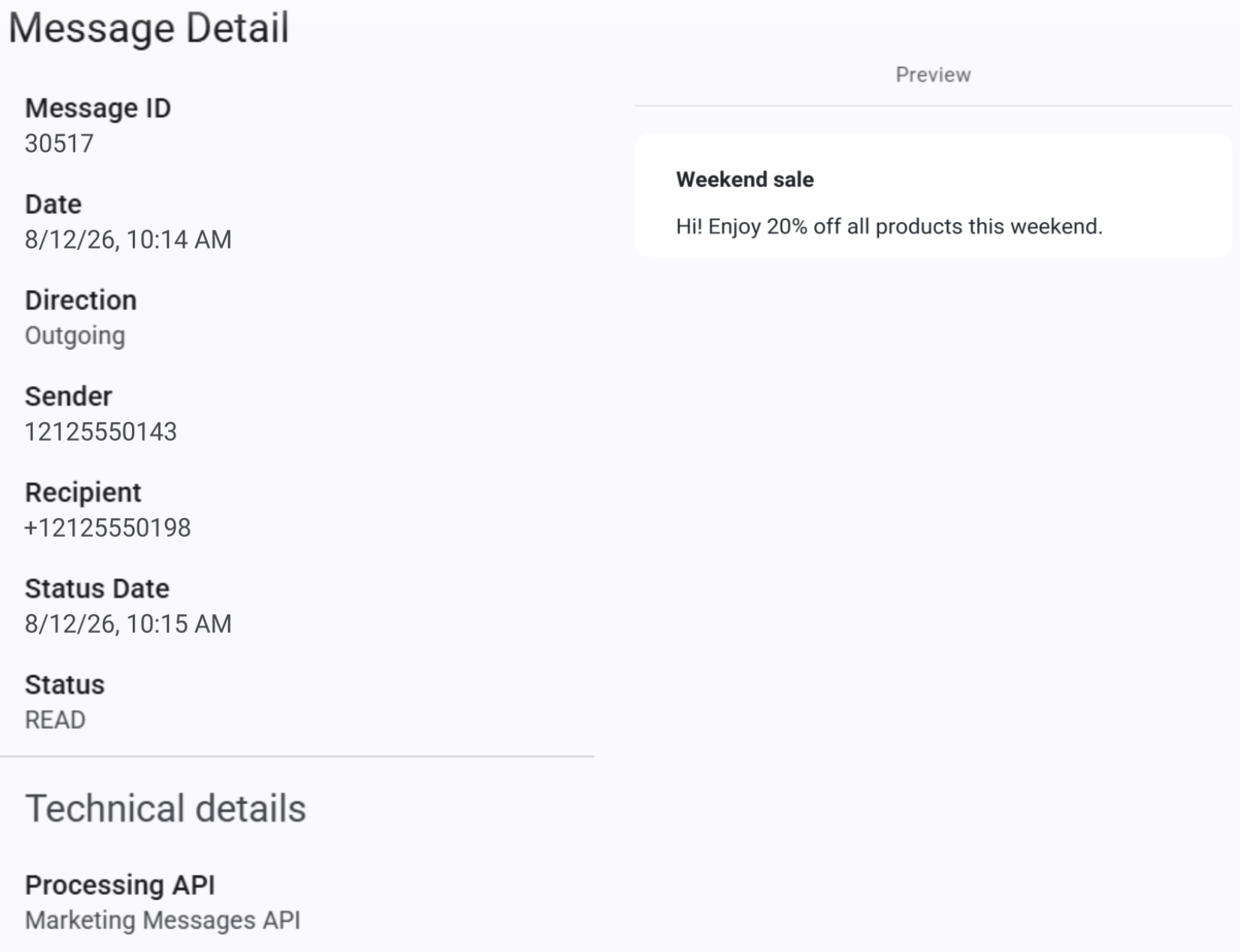
The Processing API field shows one of the following values:
| Value | Meaning |
|---|---|
Marketing Messages API | Meta processed the message through the Marketing Messages API for WhatsApp. |
Cloud API | Meta processed the message through the traditional route. |
Review the messages in Insights
The WhatsApp Insights report separates the marketing messages by route:
- The Marketing Lite column shows the marketing messages processed through the Marketing Messages API for WhatsApp.
- The Marketing column shows the marketing messages processed through the traditional route.
For more information about the columns of the report, see Messaging analytics.
Related pages
- WhatsApp message templates (Platform): create and manage WhatsApp message templates.
- Personalize marketing & utility message template: configure the content of marketing and utility message templates.
- Messaging logs: review the details of each message.
- Messaging analytics: review the WhatsApp Insights report.
Updated 20 days ago