
Sending outbound SMS
Send an outbound (MT) SMS to a contact's phone number through the Notification API, using a Long Code, Short Code, or virtual route as sender. For developers integrating programmatic SMS delivery.
Send an outbound SMS (Mobile Terminated, or MT, SMS) to an end user's phone number through the Notification API. Set the from field to a sender configured in your account, such as a Long Code, Short Code, alphanumeric shortcode, or virtual route.
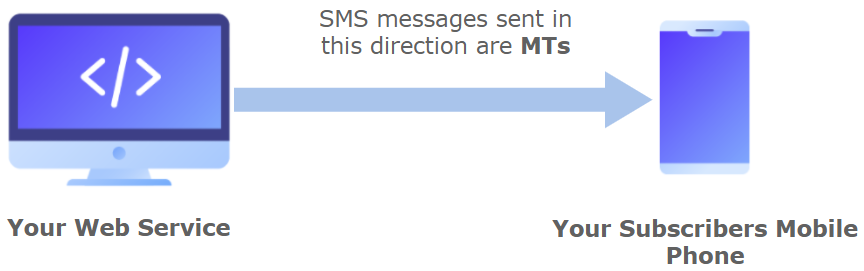
NOTEIn this API, we use the term MT because we will only send an SMS message to customers. If you desire to receive SMS messages (MO), go to the Receive SMS section.
Before you begin
- Configure the Short Code or Long Code that will send your messages.
- Use a Short Code for high-throughput, two-way messaging. A shortcode is typically a five-digit number that businesses use for opt-ins, alerts, and competitions.
- Use a Long Code for standard voice and SMS messaging. Long Codes are typically 10 digits in many countries and can send one message per second, so they are not suitable for messaging groups larger than 200 recipients.
Send an SMS
Send a new message with the Notification method.
NOTEThe total number of API Calls (requests) that the user can make to this endpoint in a certain time has been limited. That is, in case the user exceeds the limit of requests (messages sent) that can be made in a specific time, they will not be able to send another request until the established time is up. Once the time has elapsed, the request counter is reset and the request can be sent to the endpoint again.
In this example, the user can send 2 requests in 300 seconds (5 minutes). When a third request is sent within the 5 minute range, the
HTTP Status Code "429"will be generated and the following parameter will be displayed from the Response body:"errors": { "reason": "Too Many Requests" }. This code tells you that the user has sent too many requests in a given amount of time. Once the required time has elapsed, the request counter is reset to 2, so the user will be able to send two requests again in 5 minutes.To find out if the user exceeds the limit of required requests and the time they needs to wait to send the next request, we recommend consulting the Response Header (additional information about the body of the resource). The parameters presented in the response header are the following:
ratelimit-limit: 2\ratelimit-policy: 2;w= 300\ratelimit-remaining: 1\ratelimit-reset: 5m0s
- RateLimit-Limit: return the number of requests left for the client in the time window
- RateLimit-Remaining: return the remaining quota in the current window
- RateLimit-Reset: return the time remaining in the current window, specified in seconds
- RateLimit-Policy: return the quota policy. The quota policy expression can be found in paragraph 2.1 of the IETF draft. The format is, for example, for 2 requests in 300 seconds.
NOTEThe destination address ("to") of the message must be specified in E.164 format → (‘+’ and a country code). The plus sign prefix of the format is optional.
E.164 format: An ITU recommendation for the International Public Telecommunications Numbering Plan, used in the world's Public Switched Telephone Network (PSTN). It defines a common format for international phone numbers prefixed with a ( + ) sign followed by a sequence of up to 15 digits, made up of a Country Code (1 to 3 digits) and a Contact Number that includes the area code (maximum 12 digits).
Request
Send a POST request to POST /notification with the following body:
{
  "channel": "SMS",
  "request": {
    "from": "12345",
    "to": "+580000000005",
    "message": "New offer 2x1"
  },
  "callbacks": [
    "http://www.mycallback.com?id=123"
  ]
}
The following parameters are included in the request body:
| Parameter | Required | Description |
|---|---|---|
| channel | Yes | Specifies the type of delivery channel which the notification message will be sent: In this case, we enter the |
| request | Yes | Message content. |
| request. from |
Yes | Source address of the message. Specifies the Shortcode (from 1 to 6 digits), Longcode (from 7 digits on), an alphanumeric shortcode (ex. COMPANY) or a virtual number that will be used to originate and send the SMS message. Any of these codes will appear in the handset as the source of the text message. Virtual numbers will translate to a local shortcode depending on the destination carrier. If you don't have one assigned yet please contact our support team to request one. |
| request. to |
Yes | Destination address of the message. This is the cell phone number where you want to send your message to. The destination address must be specified in E.164 format → (‘+’ and a country code). The plus sign prefix of the format is optional. |
| request. message |
Yes | Content of the SMS message that will be sent to the end user. The maximum length of a short message text is 160 characters using the default GSM 03.38 alphabet. If you use any character that is not in the default alphabet, the message will be encoded in Unicode and will be divided in segments of a maximum of 70 characters each. For example, if you include an emoji in your message and the message is 150 characters long, it will be divided into three segments: the first one with 70 characters, the second one with 70 characters and the third one with just 10 characters. You will be charged per segment, not per message. |
| request. callbacks |
No | Indicate one or more (separated by comma) webhook URLs to notify about the status of the message delivery.That is, If you want to receive the status of the message you've sent to your contacts, you need to specify your endpoint. Your endpoint must have a HTTP POST access method and receive a JSON body. The URL is the external callback where the events of the SMS message will be registered and published. The following SMS message status sent to your callback URL will be the status to be recorded in the callback once the message has been sent:
To notify the status of the message delivery through a callback, the To know the parameters that will be registered and sent to your callback URL in JSON format go to the Callback URL (MT) section |
| request. externalId |
No | Alphanumeric identifier that can be used for reporting purposes. For instance, you could set the name or ID of the action that originated this SMS message so you can then identify where this API call is coming from. This is an identifier you can use to identify your messages uniquely. Typical applications are to assign a different identifier per message or per group of messages, like a message identifier. This identifier will be sent back to you if you request callbacks containing status changes of the messages you send. |
| request. clientId |
No | Unique user identifier that can be used for reporting purposes. For instance, you could set the mobile number of the user receiving the message so you can then relate this message sent with a particular user. |
Response
After the Messaging API accepts the SMS notification, it returns the following response body:
{
  "meta": {
    "timestamp": 1642531254980,
    "transactionId": "077da1d0-e089-487e-aed0-59534ba2d9f5",
    "explain": "Send Notification"
  }
}
The response body includes the following parameters:
| Parameter | Description |
|---|---|
| meta | "meta" segment is dedicated to metadata regarding the call itself. |
| meta. timestamp |
Call’s time mark. Sequence of characters identifying when the message has been sent. |
| meta. transactionId |
Call’s transaction ID, this will help our teams to locate issues faster if arose. |
| meta. explain |
Useful message regarding the operation or the call. |
The Messaging API publishes the outbound SMS to the Send SMS API queue, so the response includes the meta segment.
Updated 3 days ago