
Sending RCS
Send RCS messages through the Messaging API using a registered RCS Business Messaging (RBM) agent. For developers configuring a branded conversational entity for RCS delivery.
Send RCS messages through the Messaging API using your RCS Business Messaging (RBM) agent.
RCS (Rich Communication Services) is a communications standard that adds app-like features to text messaging. To send RCS messages, register as an RBM partner and create an agent for each brand you manage.
An agent is the branded conversational entity that sends messages to and receives responses from users. Its name, logo, description, contact information, and URLs appear in the RCS-enabled messaging app on the user's device.
Before you begin
-
Open the Business Communications Developer Console and sign in with your RBM Platform Google account.
-
Create an RBM agent:
- Click Create Agent.
- Enter your agent's name and region, then click Create agent.
- When your agent is available, select its name.
-
Create a service account key to authenticate API calls as your agent:
- In the left navigation, click Service account.
- Click Create key, then click Create.
- Store the downloaded key securely. You cannot recover the key if you lose it.
-
Copy your Agent ID. Include it in each request you send.
The Messaging API supports two RCS message types:
- Text messages
- Standalone Rich Cards with suggestions
You can also configure SMS fallback when RCS delivery is unavailable.
NOTEThe total number of API Calls (requests) that the user can make to this endpoint in a certain time has been limited. That is, in case the user exceeds the limit of requests (messages sent) that can be made in a specific time, they will not be able to send another request until the established time is up. Once the time has elapsed, the request counter is reset and the request can be sent to the endpoint again.
In this example, the user can send 2 requests in 300 seconds (5 minutes). When a third request is sent within the 5 minute range, the
HTTP Status Code "429"will be generated and the following parameter will be displayed from the Response body:"errors": { "reason": "Too Many Requests" }. This code tells you that the user has sent too many requests in a given amount of time. Once the required time has elapsed, the request counter is reset to 2, so the user will be able to send two requests again in 5 minutes.To find out if the user exceeds the limit of required requests and the time they needs to wait to send the next request, we recommend consulting the Response Header (additional information about the body of the resource). The parameters presented in the response header are the following:
ratelimit-limit: 2\ratelimit-policy: 2;w= 300\ratelimit-remaining: 1\ratelimit-reset: 5m0s
- RateLimit-Limit: return the number of requests left for the client in the time window
- RateLimit-Remaining: return the remaining quota in the current window
- RateLimit-Reset: return the time remaining in the current window, specified in seconds
- RateLimit-Policy: return the quota policy. The quota policy expression can be found in paragraph 2.1 of the IETF draft. The format is, for example, for 2 requests in 300 seconds.
Send a text RCS message
Use a text message for notifications, alerts, and conversational messages that do not need visual or interactive content.
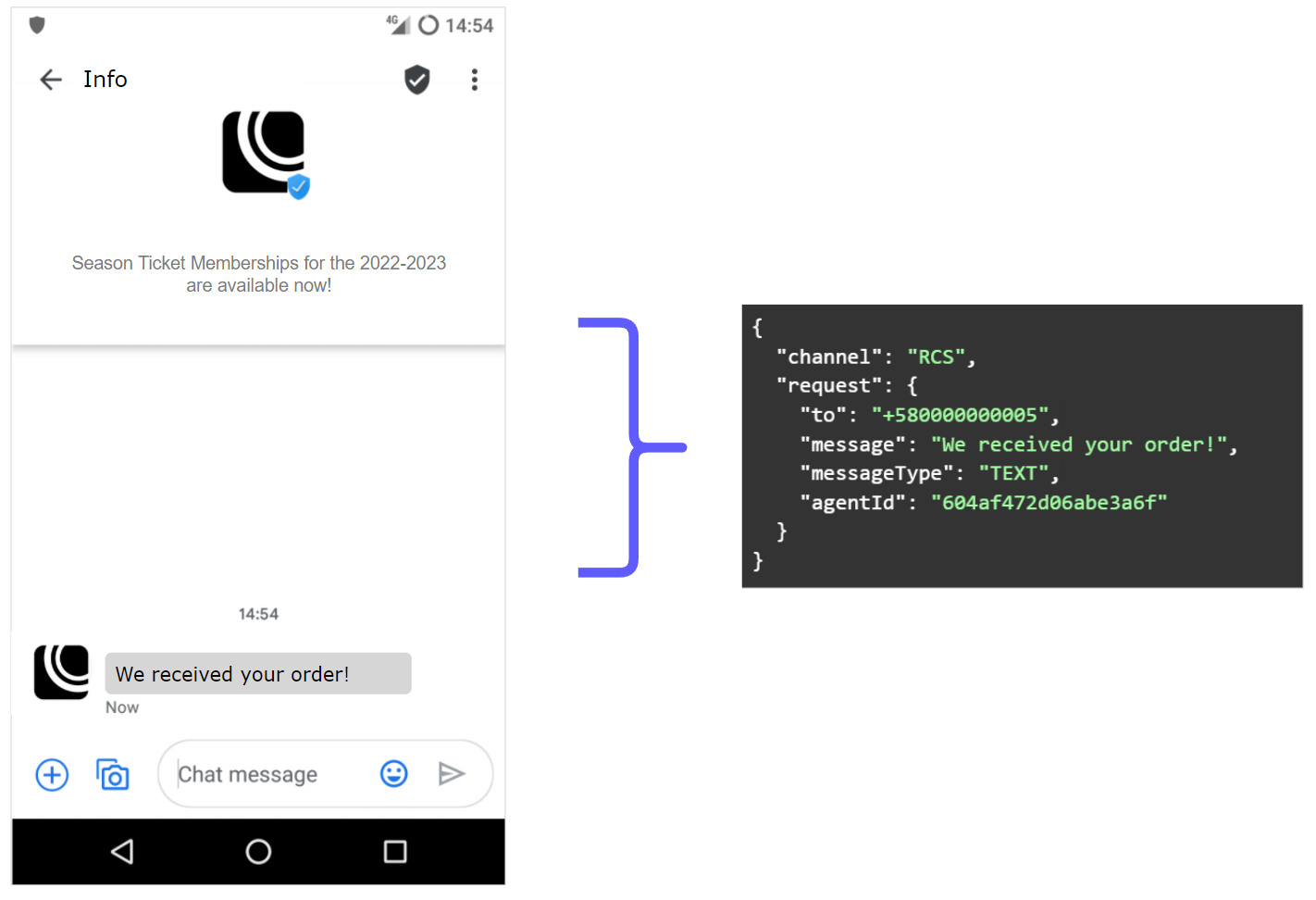
Send a text RCS message with the following request body.
HTTP request: POST / notification
{
  "channel": "RCS",
  "request": {
    "to": "+580000000005",
    "message": "text demo",
    "messageType": "TEXT",
    "agentId": "604af472d06abe3a6f5c852e"
  }
}
By default, this request sends the message through RCS.
Optional: enable SMS fallback (text message)
Add a fallback configuration to send the message as SMS when RCS delivery fails:
{
  "channel": "RCS",
  "request": {
    "to": "+580000000005",
    "message": "Welcome to Elipackage",
    "messageType": "TEXT",
    "agentId": "604af472d06abe3a6f5c852e",
    "fallbackMessage": "Welcome to Elipackage",
    "fallback": [
      {
        "type": "SMS",
        "from": "141518"
      }
    ]
  }
}
The following table describes the text RCS message request body:
| Parameter | Required | Description |
|---|---|---|
| channel | Yes | Specifies the type of delivery channel which the notification message will be sent: In this case, we enter the |
| request | Yes | Message content. |
| request. to |
Yes | Determines the destination phone number for your RCS message. Numbers are specified in E.164 format → (‘+’ and a country code). |
| request. message |
Yes | The content of the RCS message that will be sent to the end user. |
| request. messageType |
Yes | Describing the type of message which is going to be sent over RCS.
In this case, we enter the |
| request. agentId |
Yes | Agent's unique identifier. Set by RCS Business Messaging. |
| request. fallbackMessage |
No | Enter the content of the message that will be sent via SMS if the RCS delivery fails. |
| request. fallback |
No | Array of fallback objects containing the alternative channel configuration to use when RCS message delivery fails. RCS only works for Android devices that support RCS messaging. |
| fallback. from |
No | Source address of the message. Specifies the Shortcode (from 1 to 6 digits), Longcode (from 7 digits on), an alphanumeric shortcode (ex. COMPANY) or a virtual number that will be used to originate and send the SMS message. Any of these codes will appear in the handset as the source of the text message. Virtual numbers will translate to a local shortcode depending on the destination carrier. If you don't have one assigned yet please contact our support team to request one. |
| fallback. type |
No | Specifies the fallback channel to use. Currently, the only supported value is |
| request. externalId |
No | Alphanumeric identifier used for reporting purposes. |
| request. clientId |
No | Unique user identifier that can be used for reporting purposes. This is an identifier you can use to uniquely identify the destination address in your systems. This is similar to the externalId and will be sent back to you if you are requesting callbacks that contain status changes of the messages you send. |
The following table describes the response metadata for a text RCS message:
| Parameter | Description |
|---|---|
| meta | "meta" segment is dedicated to metadata regarding the call itself. |
| meta. timestamp |
Call’s time mark. Sequence of characters identifying when the message has been sent. |
| meta. transactionId |
Call’s transaction ID, this will help our teams to locate issues faster if arose. |
| meta. explain |
Useful message regarding the operation or the call. |
The Messaging API publishes the message to the RCS API queue. The response therefore includes the meta segment.
Send a standalone rich card
A Standalone Rich Card combines media and text with suggested replies or suggested actions.
A Standalone Rich Card can include:
- An image or video
- Title text
- Description text
- Up to four suggested replies or suggested actions
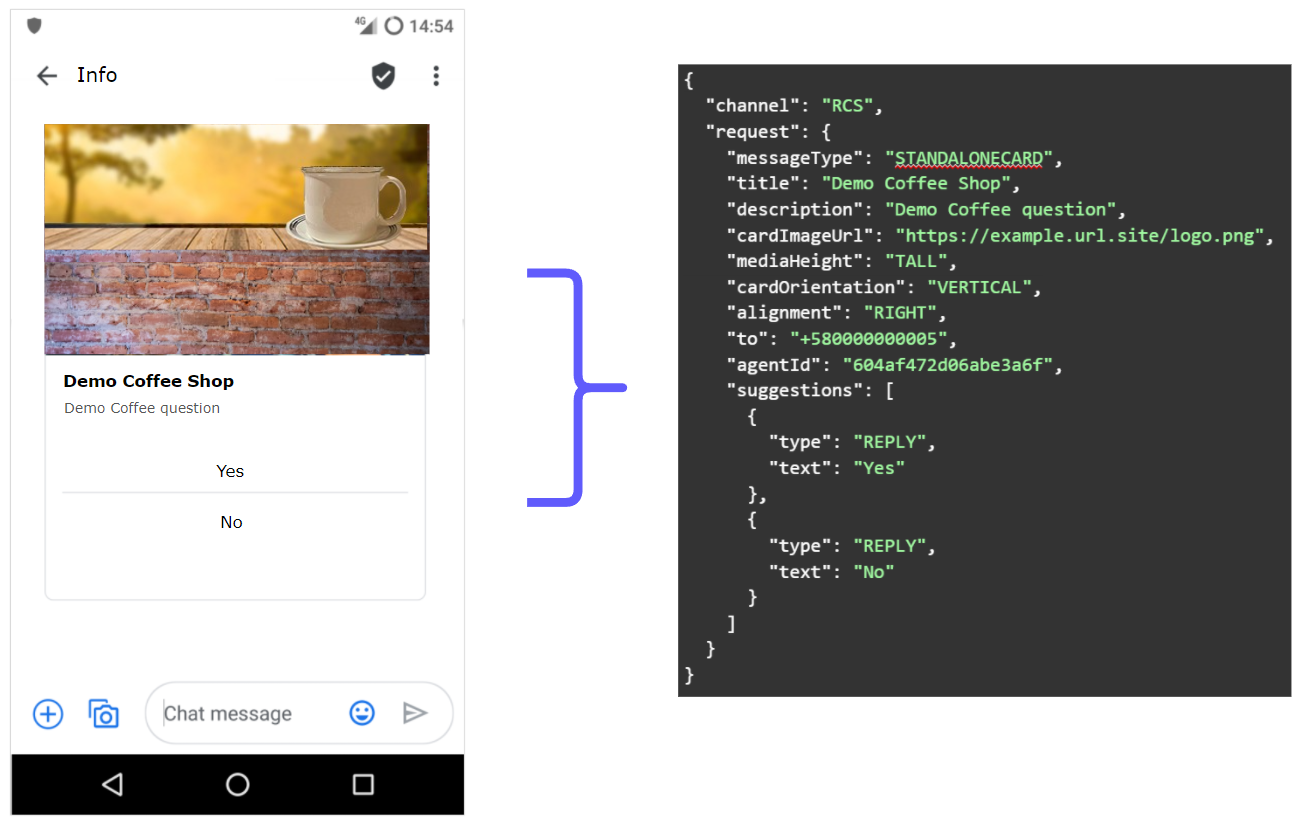
Send a Standalone Rich Card RCS message with the following request body.
HTTP request: POST / notification
{
  "channel": "RCS",
  "request": {
    "messageType": "STANDALONECARD",
    "title": "sample title",
    "cardImageUrl": "https://example.url.site/logo.png",
    "mediaHeight": "SHORT",
    "cardOrientation": "HORIZONTAL",
    "alignment": "RIGHT",
    "to": "+580000000005",
    "agentId": "604af472d06abe3a6f5c852e",
    "suggestions": [
      {
        "type": "REPLY",
        "text": "Yes"
      },
      {
        "type": "REPLY",
        "text": "No"
      }
    ]
  }
}
By default, this request sends the message through RCS.
Optional: enable SMS fallback (standalone rich card)
Add a fallback configuration to send the message as SMS when RCS delivery fails:
{
  "channel": "RCS",
  "request": {
      "messageType": "STANDALONECARD",
      "title": "sample title",
      "cardImageUrl": "https://example.url.site/logo.png",
      "mediaHeight": "SHORT",
      "cardOrientation": "HORIZONTAL",
      "alignment": "RIGHT",
      "to": "+580000000005",
      "agentId": "604af472d06abe3a6f5c852e",
      "suggestions": [
          {
              "type": "REPLY",
              "text": "Yes"
          },
          {
              "type": "REPLY",
              "text": "No"
          }
      ],
      "fallbackMessage": "Welcome to Elipackage",
      "fallback": [
          {
              "type": "SMS",
              "from": "141518"
          }
      ]
   }
}
The following table describes the Standalone Rich Card request body:
| Parameter | Required | Description |
|---|---|---|
| channel | Yes | Specifies the type of delivery channel which the notification message will be sent: In this case, we enter the |
| request | Yes | Message content. |
| request. to |
Yes | Determines the destination phone number for your RCS message. Numbers are specified in E.164 format → (‘+’ and a country code). |
| request. messageType |
Yes | Describing the type of message which is going to be sent over RCS.
In this case, we enter the |
| request. agentId |
Yes | Agent's unique identifier. Set by RCS Business Messaging. |
| request. title |
Yes | Title of the card. |
| request. mediaHeight |
Yes | Height of the card media. Values: |
| request. cardOrientation |
Yes | Orientation type defines orientation in Card message. Values: |
| request. alignment |
Yes | Alignment type defines alignment in Card message. Values: |
| request. cardImageUrl |
Yes | URL of the given resource. Type the URL of the image that is included in the card. |
| request. suggestions |
Yes | List of suggestions comprised of suggested replies and suggested actions. |
| suggestions. text |
Yes | Text that will be shown in the suggested reply. |
| suggestions. type |
Yes | Users can tap a suggested reply to send the text reply back to the agent. Value: |
| request. description |
No | Description of the card. |
| request. fallbackMessage |
No | Enter the content of the message that will be sent via SMS if the RCS delivery fails. |
| request. fallback |
No | Array of fallback objects containing the alternative channel configuration to use when RCS message delivery fails. RCS only works for Android devices that support RCS messaging. |
| fallback. from |
No | Source address of the message. Specifies the Shortcode (from 1 to 6 digits), Longcode (from 7 digits on), an alphanumeric shortcode (ex. COMPANY) or a virtual number that will be used to originate and send the SMS message. Any of these codes will appear in the handset as the source of the text message. Virtual numbers will translate to a local shortcode depending on the destination carrier. If you don't have one assigned yet please contact our support team to request one. |
| fallback. type |
No | Specifies the fallback channel to use. Currently, the only supported value is |
| request. externalId |
No | Alphanumeric identifier used for reporting purposes. |
| request. clientId |
No | Unique user identifier that can be used for reporting purposes. This is an identifier you can use to uniquely identify the destination address in your systems. This is similar to the externalId and will be sent back to you if you are requesting callbacks that contain status changes of the messages you send. |
The following table describes the response metadata for a Standalone Rich Card message:
| Parameter | Description |
|---|---|
| meta | "meta" segment is dedicated to metadata regarding the call itself. |
| meta. timestamp |
Call’s time mark. Sequence of characters identifying when the message has been sent. |
| meta. transactionId |
Call’s transaction ID, this will help our teams to locate issues faster if arose. |
| meta. explain |
Useful message regarding the operation or the call. |
The Messaging API publishes the message to the RCS API queue. The response therefore includes the meta segment.
Updated 27 days ago