
Outbound SMS
When you send an SMS to a phone number on an end user's device, you send an Outbound SMS. This is also called a Mobile Terminated (MT) SMS, though an SMS is not always sent to a mobile device today.
In an Outbound SMS, you set the "from" field to the sender configured in your account. This can be a Long Code, Short Code, alphanumeric shortcode, or virtual route.
You use the Outbound SMS API to send SMS messages to and from any country in the world through a REST API. Each message has a unique random ID. You always check a message's status using the given endpoint.
You use this API to integrate SMS (Short Message Service) messaging into your existing software platforms. It is a well-defined software interface for sending short messages via an SMS Gateway.
SMS communications infrastructure and the internet are mostly separate. SMS APIs bridge the gap between telecommunications carrier networks and the web. SMS APIs let web applications send and receive text messages through logic written for standard web frameworks.
These APIs let your business operate 24/7, providing customer notifications and information even outside business hours. Keeping customers updated on new offerings and deals supports business growth.
You use this API to quickly create and configure SMS messages to send to your customers globally in real time. You also use it to see a list of the messages sent.
The main advantage of this API is that it is quick to implement and use.
- Sends SMS messages using local numbers.
- Shows each SMS text message status sent in real time.
In order to maintain customer engagement, you send messages to keep your customers informed. This includes the most recent information, status, or alerts from your company.
You learn how to send an SMS to any phone number.
The platform supports SMS messaging at scale, with attention to speed and deliverability.
Before sending your first SMS message, you set up the short code or long code from which the message is sent.
A Short Code is a special telephone number designed for high-throughput, two-way messaging. Short codes send and receive SMS messages to and from mobile phones.
An SMS shortcode is typically a 5-digit number that can receive SMS text messages. Businesses often use shortcodes to let customers opt in to SMS broadcasts, alert services, or SMS competitions.
A Long Code is a standard phone number used to send and receive voice calls and SMS messages. Phone numbers are typically called "long codes" (10-digit numbers in many countries) when comparing them with SMS short codes (5-6 digit numbers).
With a long code, you send only one message per second. Therefore, long code text marketing does not work if you want to message groups of more than 200 people.
If you're choosing between a long and short code, a short code provides higher throughput, faster messaging, and better customer engagement.
Mobile engagement applications use several important acronyms and terms worth memorizing. The world of SMS is full of acronyms that might be confusing, especially when more than one term describes the same thing.
Two important terms you find mentioned regularly are MT and MO.
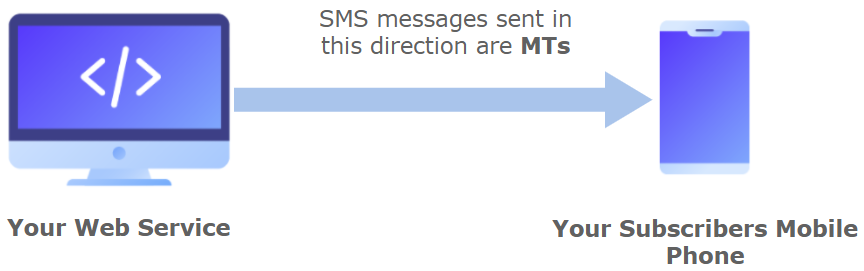
A mobile message is called an MT (Mobile Terminated) when it is routed from a client or application. It is then delivered to the end user's mobile phone.
The word Terminated means that the message is terminated (delivered) on a mobile device.
It is also known as an Outbound SMS. For example, you send the following SMS message to your contacts: "Show this voucher for 10% off your next order."
The term MO (mobile originated) refers to a message routed from an end user's mobile device. It is delivered to a mobile phone or an application.
More precisely, this is a message that a customer/contact sends from a mobile phone to a web application or platform. For example, you send the following SMS message to your customer waiting for a response from them: "Send PIZZA to 7878 for 30% off your next order!"
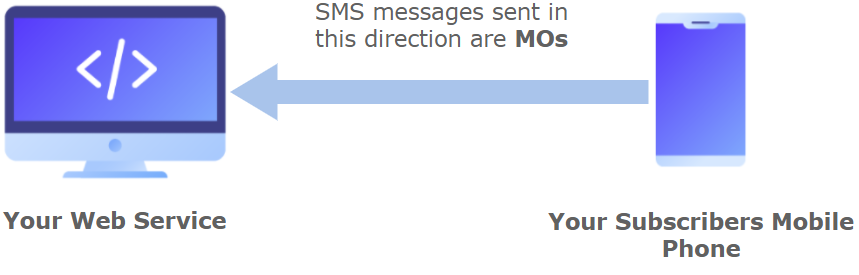
You send SMS messages only. This is why the API uses the term MT. The Receive SMS section covers how to receive SMS messages (MO).
NOTEThe destination address ("to") of the message must be specified in E.164 format → (‘+’ and a country code). The plus sign prefix of the format is optional.
E.164 format: An ITU recommendation for the International Public Telecommunications Numbering Plan, used in the world's Public Switched Telephone Network (PSTN). It defines a common format for international phone numbers.
The format starts with a
+sign, followed by up to 15 digits total. These digits include a Country Code (1 to 3 digits) and a Contact Number with the area code (maximum 12 digits).
SMS EncodingWhen sending SMS messages, the type of characters used directly affects how the message is encoded. It also affects how many characters fit into each SMS.
It also affects how messages are segmented during delivery.
Messages that include special symbols, accented letters, or non-Latin characters may switch to a different encoding format. This can reduce the maximum characters per segment. It can also increase message cost.
The Encoding & Optimization for Multilingual SMS section covers character encoding and how special characters affect SMS segmentation.
Message Throughput (TPS)The Message Throughput (TPS) section covers delivery throughput and how TPS is applied across channels (SMS).
Sending an SMS Message
SMS APIs connect telecom carriers to the internet, avoiding the need for a platform or software "middleman" to achieve this functionality. After integrating an SMS API, logging in manually to send SMS messages becomes a thing of the past.
When you send an SMS text message, the request body contains the following data:
HTTP Request: POST /messages
{
  "from": "12345",
  "text": "text demo",
  "to": "+580000000005"
}
The parameters presented in the request body example when sending the SMS text message are the following:
| Parameter | Required | Description |
|---|---|---|
| from | Yes |
Source address of the message. Specifies the shortcode (1 to 6 digits), long code (7 or more digits), an alphanumeric shortcode (e.g., COMPANY), or a virtual number used to originate and send the SMS message. Any of these codes appears in the handset as the source of the text message. Virtual numbers translate to a local shortcode depending on the destination carrier. If you don't have one assigned yet, you contact the support team to request one. |
| text | Yes |
Content of the SMS message sent to the end user. The maximum length of a short message text is 160 characters, using the default GSM 03.38 alphabet. If you use a character outside the default alphabet, the message is encoded in Unicode. It is then divided into segments of a maximum of 70 characters each. For example, an emoji in a 150-character message divides it into three segments: 70 characters, 70 characters, and 10 characters. You are charged per segment, not per message. |
| to | Yes |
Destination address of the message. This is the recipient's cell phone number. The destination address must be specified in E.164 format → (‘+’ and a country code). The plus sign prefix is optional. |
| requestDR | No |
Request a Delivery Receipt to the carrier.
The default is |
| connection | No |
Name of the connection to indicate which carrier to send the message to. This parameter resolves ambiguity between destination carriers you are allowed to send to. If you need to indicate this parameter, the support team provides a list of connection names to use for your case. |
| callbacks | No |
One or more (comma-separated) webhook URLs to notify about the status of the message delivery. If you want to receive the status of the message you've sent to your contacts, you specify your endpoint. Your endpoint must have an HTTP POST access method. It also receives a JSON body. The URL is the external callback that receives the SMS message events. This status is sent to your callback URL once the message has been sent:
To notify the status of the message delivery through a callback, the The Callback URL (MT) section covers the parameters sent to your callback URL in JSON format. |
| No | Email associated with destination. |
|
| type | No |
Specifies the direction of the SMS message. Two options are available:
The default is |
| externalId | No |
Alphanumeric identifier for reporting purposes. For instance, you set the name or ID of the action that originated this SMS message. This helps you identify where the API call is coming from. You use this identifier to identify your messages uniquely. Typical applications assign a different identifier per message or per group of messages, like a broadcast identifier. The platform sends this identifier back to you if you request callbacks containing status changes of the messages you send. |
| clientId | No |
Unique user identifier for reporting purposes. You use this identifier to uniquely identify the destination address in your systems. It is similar to the externalId. The platform sends it back to you if you request callbacks containing status changes of the messages you send. |
When you send the SMS text message, the response body contains the following data:
{
  "meta": {
    "timestamp": 1629174338140,
    "transactionId": "c4cdd080-fbbf-46e3-aff1-311e21f5048c"
  },
  "data": {
    "id": "611b3a42c5f7904590c17d1f",
    "from": "12345",
    "text": "text demo",
    "to": "+580000000005",
    "requestDR": true,
    "type": "MT",
    "owner": "[email protected]",
    "operator": "[email protected]",
    "status": "QUEUE",
    "date": "2021-08-17T04:25:38.117592194Z"
  }
}
The parameters presented in the response body example when sending the SMS text message are the following:
| Parameter | Description |
|---|---|
| data | Data contained in the SMS message. |
| data. id |
Unique identifier of the SMS message. |
| data. from |
Source address of the message. Shortcode (1 to 6 digits), long code (7 or more digits), an alphanumeric shortcode (e.g., COMPANY), or a virtual number used to originate and send the SMS message. Any of these codes appears in the handset as the source of the text message. Virtual numbers translate to a local shortcode depending on the destination carrier. |
| data. text |
Content of the SMS message sent to the end user. The maximum length of a short message text is 160 characters, using the default GSM 03.38 alphabet. If you use a character outside the default alphabet, the message is encoded in Unicode. It is then divided into segments of a maximum of 70 characters each. For example, an emoji in a 150-character message divides it into three segments: 70 characters, 70 characters, and 10 characters. You are charged per segment, not per message. |
| data. to |
Destination address of the message. This is the recipient's cell phone number. The destination address must be specified in E.164 format → (‘+’ and a country code). The plus sign prefix is optional. |
| data. owner |
Owner or creator of the SMS transaction. |
| data. operator |
A user in the owner's or creator's Workspace. |
| data. status |
When the SMS message is sent, the system assigns one of the following possible statuses to the message:
|
| data. date |
Date of the last update or status change. |
| data. requestDR |
Optional. Request a Delivery Receipt to the carrier.
The default is |
| data. connection |
Optional. Name of the connection to indicate which carrier to send the message to. This parameter resolves ambiguity between destination carriers you are allowed to send to. If you need to indicate this parameter, the support team provides a list of connection names to use for your case. |
| data. callbacks |
Optional. One or more (comma-separated) webhook URLs to notify about the status of the message delivery. If you want to receive the status of the message you've sent to your contacts, you specify your endpoint. Your endpoint must have an HTTP POST access method. It also receives a JSON body. The URL is the external callback that receives the SMS message events. This status is sent to your callback URL once the message has been sent:
To notify the status of the message delivery through a callback, the The Callback URL (MT) section covers the parameters sent to your callback URL in JSON format. |
| data. |
Optional. Email associated with destination. |
| data. type |
Optional. The default is |
| data. externalId |
Optional. Alphanumeric identifier for reporting purposes. For instance, you set the name or ID of the action that originated this SMS message. This helps you identify where the API call is coming from. You use this identifier to identify your messages uniquely. Typical applications assign a different identifier per message or per group of messages, like a broadcast identifier. The platform sends this identifier back to you if you request callbacks containing status changes of the messages you send. |
| data. clientId |
Optional. Unique user identifier for reporting purposes. You use this identifier to uniquely identify the destination address in your systems. It is similar to the externalId. The platform sends it back to you if you request callbacks containing status changes of the messages you send. |
Sending Batch SMS Messages
With this endpoint, you send multiple SMS messages in one POST call.
Batch Recipient LimitEach batch request supports a maximum of 1,000 destination phone numbers in the to array.
If your request contains more than 1,000 recipients, the API rejects it. It returns an HTTP 400 Bad Request response.
If you need to send messages to more than 1,000 recipients, you split your recipient list into multiple requests, each containing up to 1,000 phone numbers.
In your request body, you include the following parameters to send multiple SMS messages:
HTTP Request: POST /v3/messages/batch
{
   "from":"12345",
   "text":"Hi {0}, your balance is ${1}",
   "to":[
      {
         "to":"+525500000000",
         "params":[
            "Elizabeth",
            10.65
         ]
      },
      {
         "to":"+525511111111",
         "params":[
            "Joshua",
            20.5
         ]
      }
   ],
   "type":"MT"
}
The parameters presented in the request body example when sending the SMS text message are the following:
| Parameter | Required | Description |
|---|---|---|
| from | Yes |
Source address of the message. Specifies the shortcode (1 to 6 digits), long code (7 or more digits), an alphanumeric shortcode (e.g., COMPANY), or a virtual number used to originate and send the SMS message. Any of these codes appears in the handset as the source of the text message. Virtual numbers translate to a local shortcode depending on the destination carrier. If you don't have one assigned yet, you contact the support team to request one. |
| text | Yes |
Content of the SMS message sent to the end user. The maximum length of a short message text is 160 characters, using the default GSM 03.38 alphabet. If you use a character outside the default alphabet, the message is encoded in Unicode. It is then divided into segments of a maximum of 70 characters each. For example, an emoji in a 150-character message divides it into three segments: 70 characters, 70 characters, and 10 characters. You are charged per segment, not per message. |
| to | Yes | Array of destination addresses for the end users you want to message. |
| to. to |
Yes |
Destination address of the message. This is the recipient's cell phone number. The destination address must be specified in E.164 format → (‘+’ and a country code). The plus sign prefix is optional. |
| to. params |
Yes |
Only applies if the content of the SMS message ( Array of personalized field (placeholder) values for the SMS message. You set placeholder values in the same order the placeholders were defined in the SMS message. For example, the You enter the values of both placeholders in the order they were defined, separated by commas → {Elizabeth, 28}. The first placeholder value represents the name of the end user who receives the message. The second placeholder value represents the temperature in degrees where the end user is located. |
| requestDR | No |
Request a Delivery Receipt to the carrier.
The default is |
| connection | No |
Name of the connection to indicate which carrier to send the message to. This parameter resolves ambiguity between destination carriers you are allowed to send to. If you need to indicate this parameter, the support team provides a list of connection names to use for your case. |
| callbacks | No |
One or more (comma-separated) webhook URLs to notify about the status of the message delivery. If you want to receive the status of the message you've sent to your contacts, you specify your endpoint. Your endpoint must have an HTTP POST access method. It also receives a JSON body. The URL is the external callback that receives the SMS message events. This status is sent to your callback URL once the message has been sent:
To notify the status of the message delivery through a callback, the The Callback URL (MT) section covers the parameters sent to your callback URL in JSON format. |
| No | Email associated with destination. |
|
| type | No |
Specifies the direction of the SMS message. Two options are available:
The default is |
| externalId | No |
Alphanumeric identifier for reporting purposes. For instance, you set the name or ID of the action that originated this SMS message. This helps you identify where the API call is coming from. You use this identifier to identify your messages uniquely. Typical applications assign a different identifier per message or per group of messages, like a broadcast identifier. The platform sends this identifier back to you if you request callbacks containing status changes of the messages you send. |
| clientId | No |
Unique user identifier for reporting purposes. You use this identifier to uniquely identify the destination address in your systems. It is similar to the externalId. The platform sends it back to you if you request callbacks containing status changes of the messages you send. |
When you send the SMS text messages, the response body contains the following data:
{
  "meta": {
    "timestamp": 1597166699457,
    "transactionId": "70169d77-c165-35b8a3af96fb",
    "explain": "a descriptive text"
  },
  "data": {
    "ids": [
      {
        "id": "507f1f77b",
        "mobile": "+525500000000"
      },
      {
        "id": "507Abg71A",
        "mobile": "+525511111111"
      }
    ],
    "from": "12345",
    "text": "Hi {0}, your balance is ${1}",
    "type": "MT",
    "owner": "owner",
    "operator": "operator",
    "status": "QUEUE",
    "date": "2020-06-22T15:06:37.909584Z"
  }
}
The parameters presented in the response body example when sending the SMS text messages are the following:
| Parameter | Description |
|---|---|
| data | Data contained in the SMS message. |
| data. ids |
Array containing the destination address of each end user and the unique identifier (id) of each message sent. |
| data. ids. id |
Unique identifier of the SMS message. |
| data. ids. mobile |
Destination address of the message. This is the end user's cell phone number. The destination address is specified in E.164 format → (‘+’ and a country code). The plus sign prefix is optional. |
| data. invalidNumber |
Array containing invalid destination mobile numbers. |
| data. from |
Source address of the message. Shortcode (1 to 6 digits), long code (7 or more digits), an alphanumeric shortcode (e.g., COMPANY), or a virtual number used to originate and send the SMS message. Any of these codes appears in the handset as the source of the text message. Virtual numbers translate to a local shortcode depending on the destination carrier. |
| data. text |
Content of the SMS message sent to the end user. The maximum length of a short message text is 160 characters, using the default GSM 03.38 alphabet. If you use a character outside the default alphabet, the message is encoded in Unicode. It is then divided into segments of a maximum of 70 characters each. For example, an emoji in a 150-character message divides it into three segments: 70 characters, 70 characters, and 10 characters. You are charged per segment, not per message. |
| data. owner |
Owner or creator of the SMS transaction. |
| data. operator |
A user in the owner's or creator's Workspace. |
| data. status |
When the SMS message is sent, the system assigns one of the following possible statuses to the message:
|
| data. date |
Date of the last update or status change. |
| data. requestDR |
Optional. Request a Delivery Receipt to the carrier.
The default is |
| data. connection |
Optional. Name of the connection to indicate which carrier to send the message to. This parameter resolves ambiguity between destination carriers you are allowed to send to. If you need to indicate this parameter, the support team provides a list of connection names to use for your case. |
| data. callbacks |
Optional. One or more (comma-separated) webhook URLs to notify about the status of the message delivery. If you want to receive the status of the message you've sent to your contacts, you specify your endpoint. Your endpoint must have an HTTP POST access method. It also receives a JSON body. The URL is the external callback that receives the SMS message events. This status is sent to your callback URL once the message has been sent:
To notify the status of the message delivery through a callback, the The Callback URL (MT) section covers the parameters sent to your callback URL in JSON format. |
| data. |
Optional. Email associated with destination. |
| data. type |
Optional. The default is |
| data. externalId |
Optional. Alphanumeric identifier for reporting purposes. For instance, you set the name or ID of the action that originated this SMS message. This helps you identify where the API call is coming from. You use this identifier to identify your messages uniquely. Typical applications assign a different identifier per message or per group of messages, like a broadcast identifier. The platform sends this identifier back to you if you request callbacks containing status changes of the messages you send. |
| data. clientId |
Optional. Unique user identifier for reporting purposes. You use this identifier to uniquely identify the destination address in your systems. It is similar to the externalId. The platform sends it back to you if you request callbacks containing status changes of the messages you send. |
Updated 12 days ago